Introduction au câblage du robot FRC
Note
This document details the wiring of a basic electronics board for the Kitbot using components provided in recent Kit of Parts. For a more general reference to wiring which includes other components, see Introduction to FRC Robot Wiring
Aperçu
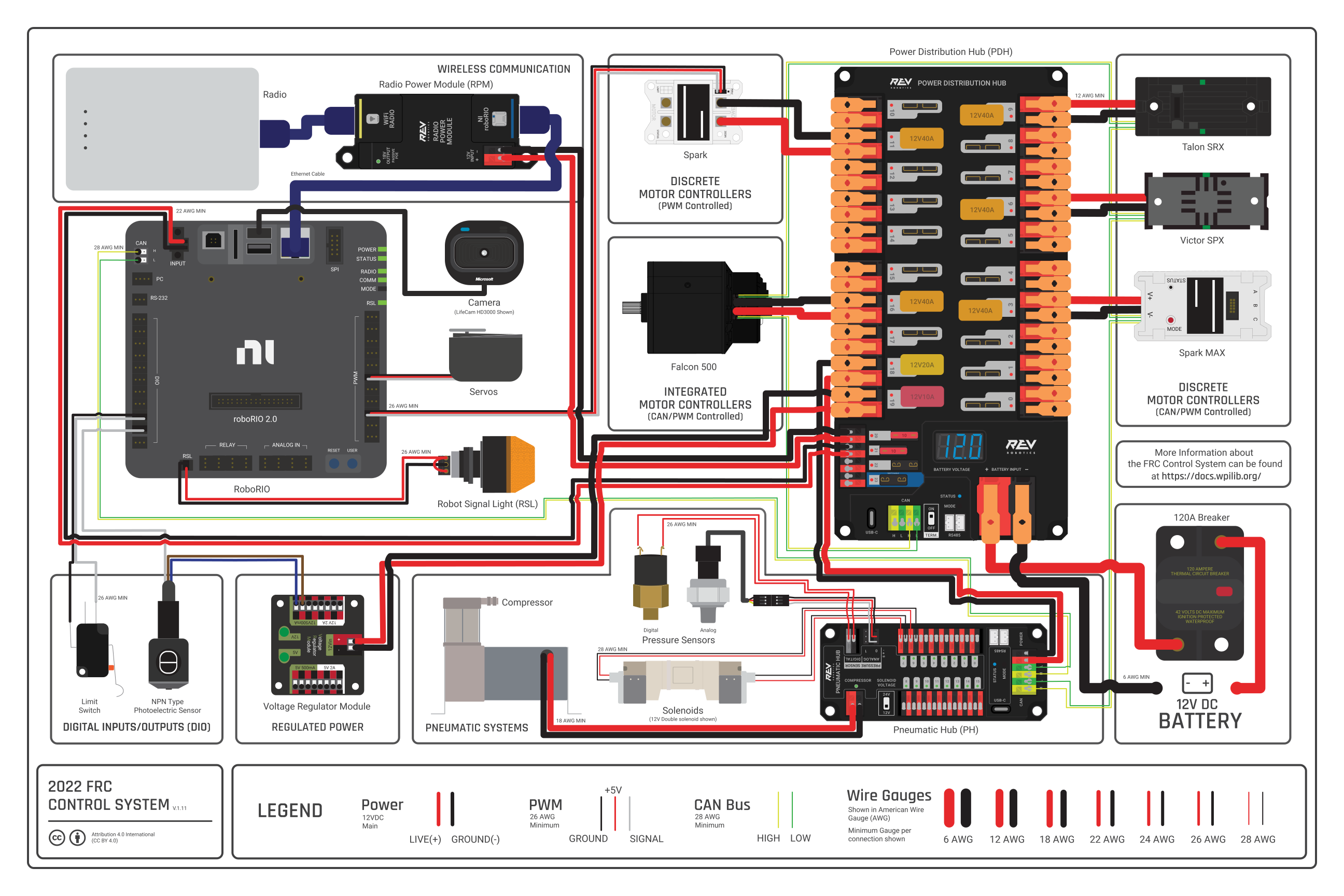
Diagramme gracieuseté de l’équipe FRC® 3161 et Stefen Acepcion.
Rassembler des Matériaux
Localisez les outils et composants de système de contrôle suivants
Matériaux du Kit:
Power Distribution Hub (PDH)
roboRIO
Vivid Hosting VH-109 radio (may be already installed on Kitbot)
Robot Signal Light (RSL) (may be already installed on Kitbot)
6x SPARK MAX
Disjoncteur 120A
4x Disjoncteur 40A
1x 30A Circuit breaker
Fil rouge 6 AWG (16 \(mm^2\))
Fil rouge/noir 18 AWG (1 \(mm^2\))
Vivid Hosting PoE Injector cable or similar
14 Wago 221 inline splicing connector with lever
2x Connecteurs de batterie Anderson SB50
Cosses pour bornes de raccordement 6 AWG (16 \(mm^2\))
Batterie 12V
Ruban électrique Rouge/Noir
Ruban Velcro avec double bande adhésive, ou vis
Attaches de style Tie-wrap ou Zip Ties
1/2in (12mm) plywood
Outils Nécessaires:
Minuscule tournevis à tête plate (style réparation de lunettes)
Wire cutters, wire stripper (6, 10, 18, 22 AWGs), and terminal crimper (6AWG terminal) or vice
7/16in (11mm may work if imperial is unavailable) box end wrench or nut driver
Additional 7/16in wrench/nut driver or Philips head screw driver
Scissors
Drill with 1/4in (6mm) bit
Créer le panneau de support pour le Système de Contrôle
The instructions below heavily rely on the wiring pre-attached to components. The layout provided is designed around using a single board which mounts to the top of the inner rails of the AM14U chassis. Teams are welcome to modify this design and layout but note that additional connectors and wire may be required.
Disposer les Composants du Système de Contrôle de Base

Lay out the components on the board. An example layout is shown in the image above. The radio and RSL will be mounted directly to the Kitbot superstructure. It is recommended to wire as much as possible before installing the board in the robot, the board is difficult to work on while installed. The board has very little clearance between the PDH and the bottom of the hopper, locate the PDH as far towards the back of the robot as possible while still allowing room for wires between the PDH and roboRIO.
L’alimentation du Contrôleur de moteur

Requires: Wire Stripper
Connect each motor controller’s input power (red/black side with no white) to the PDHs high current output channels.
Details
Strip approximately 1/2 in. (~12mm) of insulation off the red and black power input wires for one SPARK MAX. While the SPARK MAX wire is 12 AWG, because it is high strand count, the 10 AWG size on your wire strippers may work better.
Lift both levers on the PDH for one high current channel until they latch open (the red and black terminals for one channel are indicated by the white label across them below and behind the terminals).
Carefully insert the stripped wire all the way into the terminals and press the latches back down to secure the wires.
Repeat for each controller. Pay attention to which controllers wire to which channel to ensure all controllers will reach without extension.
Astuce
If the wire end has become a bit messy and is hard to insert cleanly, a small twist (~ 1/2 a turn) may help. Do not heavily twist the wire, this prevents the terminal inside the PDH from making solid contact with the wire.
Fixer les composants
Requires: Recloseable fastener, scissors, drill with bit
Cable ties plus reclosable fastener make a great pair for securing robot electronics. The cable ties help hold the components down while the recloseable fastener helps hold them in place. The instructions below describe securing your electronics with this method, though you may choose to use hardware (nuts and bolts) to secure some components instead.
Details
Secure each item down with recloseable fastener. One easy way to do this is to secure the two sides of the fastener together, peel one backing, secure the fastener(s) to the component, then peel the other backing and carefully press the component into place on the board. To ensure you have enough fastener for both electronics and the battery door, some recommended lengths are provided below:
SPARK MAX: 2x 1 in. pieces each
roboRIO: 4x 1 in. pieces
PDH: 3x 2 in. pieces (or 4x 1 in.)
120A Breaker: 2x 2 in. pieces
Mark hole locations for drilling ziptie holes
SPARK MAX: 2x holes centered between each SPARK MAX (1 aligned with each ziptie notch) plus 2x just outside each outer controller. 2 cable ties will pass through each hole.
PDH: 1 hole directly underneath each device mounting hole (4x total), 1 holes just outside the device footprint near each mounting hole (4x total)
roboRIO: 1 hole directly underneath each ziptie notch (4x total), 1 hole just outside the device footprint near each mounting hole (4x total)
120A breaker: 1 hole directly underneath each device mounting hole (2x total), 1 hole just outside the device footprint near each mounting hole (2x total)
Remove components and drill holes. Using a « rocking » or « peeling » motion can often help remove components from recloseable fastener without removing the fastener adhesive.
Place the components back down on the boards. You may wish to wait to actually secure components with cable ties until wiring is complete. Some cable ties may be able to double as wire management.
CAN Bus connections - SPARK MAXes

Requires: SPARK MAX CAN Cables and Cable retention clips (found in SPARK MAX boxes)
The SPARK MAX controllers and PDH will communicate with the roboRIO over CAN. Connect the SPARK MAX CAN cables in a chain, skipping the 3rd controller and coming back to it, as shown by the red arrows.
Details
Insert a SPARK MAX CAN Cable into each SPARK MAX.
Starting with the single SPARK MAX near the roboRIO, take either end of the CAN cable and connect to the opposite end of the CAN cable from the SPARK MAX closest to the battery notch.
Secure the connection by placing a Cable retention clip over the joined connectors.
Using the remaining end from the SPARK MAX near the battery notch skipping the controller directly above connect to the third SPARK MAX in the cluster of four.
Then connect from the third SPARK MAX to the fourth in the group, followed by the SPARK MAX closest to the PDH.
Finally, connect the last SPARK MAX, that you skipped earlier.
You should now have a chain that connects all the SPARK MAX controllers together with a free end on the SPARK MAX closest to the roboRIO and on the second controller in from the battery notch.
You may want to use cable ties to organize the extra CAN wire before moving on.
CAN Bus connections - PDH and roboRIO

Requires: Wire cutters, wire stripper (22 AWG)
Connect one free end of the CAN bus chain to the PDH and the other to the roboRIO.
Details
Locate the free end of the CAN cable connected to the SPARK MAX in the group of four. Cut off the connector and strip 5/16in (~8mm) of both the yellow and green wire.
Insert each wire into the corresponding terminal on the roboRIO by holding down the white button with a fingernail or screw driver while inserting the wire. Give the wire a sharp tug to ensure it has been inserted properly.
Locate the remaining free end of the CAN chain (attached to the single isolated SPARK MAX). Cut off the connector and strip 3/8in (~9mm) of both the yellow and green wire.
Insert each wire into either matching colored terminal of the PDH by either depressing the button or opening the latch (depending on PDH version).
Ensure the PDH CAN termination switch (labeled « TERM » and located next to the CAN terminals) is set to ON. If not, adjust with a small screw driver.
Attachez le connecteur latéral de la batterie du Robot.

Requires: Battery Connector, 1x 6 AWG (16 \(mm^2\)) terminal lugs, 7/16in (11mm) Box end
Attach the red wire from the battery connector to the main breaker using a terminal lug and attach the black side to the power input of the PDH.
Details
Attach terminal lug to positive (red) wire of battery connector. Strip .75in off the black wire.
Levez le levier au-dessus de l’entrée principale d’alimentation sur le PDH jusqu’il clique en place. Insérez le fil. Abaissez le levier pour sécuriser le fil.
Using a 7/16in (11mm) box end wrench, remove the nut on the « Batt » side of the main breaker and secure the positive terminal of the battery connector
Connectez le disjoncteur au panneau de distribution.

Requires: 6 AWG (16 \(mm^2\)) red wire, 1x 6 AWG (16 \(mm^2\)) terminal lugs, 7/16in (11mm) wrench
Connect 6AWG wire between the second terminal of the 120A circuit breaker and the red power input of the PDH
Details
Secure one terminal lug to the end of the 6 AWG (16 \(mm^2\)) red wire.
Using the 7/16in (11mm) wrench, remove the nut from the « AUX » side of the 120A main breaker and place the terminal over the stud.
Loosely secure the nut (you may wish to remove it shortly to cut and strip the other end of the wire). Measure out the length of wire required to reach the positive terminal of the PDH.
Coupez et dénudez l’autre extrémité du fil rouge.
À l’aide de la clé de 7/16 » (11 mm), fixez le fil du côté « AUX » du disjoncteur principal de 120 A.
Soulevez le levier de la borne d’entrée positive (rouge) du PDH, insérez le fil, puis fermez la borne.
Isolation des connexions au PDP

Requiert: ruban électrique
En utilisant un ruban électrique, isolez les deux connexions du disjoncteur 120A.
L’alimentation du roboRIO


Nécessite : un mini fusible 10 A, une pince à dénuder, un très petit tournevis plat, 18 AWG (1 \(mm^2\)) rouge et noir
Using 18AWG wire, connect a non-switchable fused channel of the PDH (20-22) with a 10A fuse to the power connector of the roboRIO
Details
Insérez le fusible 10A dans le PDH dans l’un des canaux à fusibles non commutables (20-22).
Dénudez ~5/16 » (~8 mm) sur les fils rouge et noir 18 AWG (1 \(mm^2\)) et connectez-les aux bornes correspondantes sur le canal PDH où le fusible a été installé.
Mesurez la longeur nécessaire pour atteindre l’entrée d’alimentation sur le roboRIO. Prenez soin de laisser une longeur suffisante pour acheminer les fils autour de tout autre composant tel que la batterie et pour allouer assez de longueur pour gérer convenablement la disposition des câbles.
Coupez et dénudez le fil.
En utilisant le minuscule tournevis à tête plate, connectez les fils aux bornes d’alimentation du roboRIO (rouge à V, noir à C). Assurez aussi que le connecteur d’alimentation est vissé solidement au roboRIO.
Alimentation de la radio

Requires: Vivid Hosting PoE adapter cable
Connect the PoE adapter cable to a non-switchable fused channel (20-22) with a 10A fuse to power the VH-109 radio.
Details
Insérez le fusible 10A dans le PDH dans l’un des canaux à fusibles non commutables (20-22).
Lift the levers of the PDH terminals for that channel, insert the ferrules from the red and black wires on the PoE adapter into the corresponding terminals, then close the levers.
Connect the Ethernet plug of the PoE adapter to the roboRIO.
Avertissement
The Vivid PoE adapter works opposite of the REV PoE adapter. The REV PoE adapter can not be directly substituted for the 2026 KitBot. If the Vivid PoE adapter is not available, wire power directly to the radio 12V port and connect the roboRIO to the AUX2 port if the radio is not the V1.5 hardware revision.
Les disjoncteurs

Requires: 6x 40A circuit breakers
Insérez les disjoncteurs de 40 A dans les positions du PDH correspondant aux connecteurs Wago auxquels les contrôleurs de moteur sont connectés. Notez que le graphique blanc indique quels disjoncteurs sont associés à quelles paires de bornes.
Pause

If you are preparing the wiring outside the robot, pause at this point. The remaining wiring must be completed after the board is installed on the robot.
Ethernet Cable

Requires: 1x Ethernet cable
Connect an Ethernet cable from the RJ45 (Ethernet) socket of the PoE adapter to the RIO port on the VH-109 radio.
Lumière de Signal du Robot

Requires: Wire stripper, 2 pin cable with Molex jacket from Molex box, Robot Signal Light, 18 AWG (1 \(mm^2\)) red wire, very small flat screwdriver
Using the 2 Pin Molex cable, connect the roboRIO RSL port to 2 terminals of the RSL (black wire in the middle) and using 18AWG red wire, jumper the outside two ports together.
Details
Using a small flat screwdriver, ensure the terminals of the RSL wiring connector are open.
Take the loose end of the 2 pin cable (or cut off one connector if both ends have connectors) and Insert the black wire into the center, « N » terminal and tighten the terminal.
Dénudez le fil rouge 18 AWG (1 \(mm^2\)) et insérez-le dans la borne « La » et serrez la borne.
Coupez et dénudez l’autre extrémité du fil 18 AWG (1 \(mm^2\)) à insérer dans la borne « Lb »
Insérez le fil rouge du câble à deux broches dans la borne « Lb » avec le fil rouge 18 AWG (1 \(mm^2\)) et serrez la borne.
Connectez le connecteur à deux broche au port RSL sur le roboRIO. Le fil noir devrait être plus proche à l’extérieur du roboRIO.
Alimentation des moteurs

Requires: Wire stripper, 14x Wago 221 terminals, 12AWG wire
For each motor, use the Wago 221 terminals to connect the output of the motor controller to the motor. A recommended arrangement is to use the isolated SPARK MAX for the feeder motor, the other single SPARK MAX for the intake/launcher, and the four grouped SPARK MAXes for the Drivetrain, split into pairs for each side. Note that for the intake/launcher motor, an additional intermediate connection is recommended in order to have the necessary length to route the wire safely along robot elements.
Details
Using the print on the side of the 221 connector (upper left image) as a guide, strip 11mm from the end of one wire.
Lift the orange lever of the 221 connector until it latches up, then insert the wire fully into the terminal. Flip the lever back down.
Using the inspection window on the bottom of the connector, check that the wire is fully inserted by verifying the wire is visible beyond the metal funnel of the terminal.
Repeat this process to connect each drivetrain CIM motor and the feeder motor directly to a motor controller output, red-to-red, black-to-black.
For the intake/launcher motor, it is recommend to use 12AWG wire as an extension. Attach 12AWG wire to the motor wires, then run the wire along robot components until you reach the motor contoller. Cut and strip the 12AWG extension wire and secure to the motor controller output.
STOP
Danger
Avant de brancher la batterie, assurez-vous que toutes les connexions ont été faites avec la bonne polarité. Idéalement, demander à quelqu’un qui n’a pas câblé le robot de valider que toutes les connexions soient correctes.
Commencez avec la batterie et vérifiez que le fil rouge est connecté à la borne positive
Vérifiez que le fil rouge passe à travers le disjoncteur principal et aboutit à la borne positive + du PDP et que le fil noir se rend directement à la borne négative -.
Pour chaque contrôleur de moteur, vérifiez que le fil rouge va de la borne rouge PDP à la borne V+ du contrôleur de moteur (pas M+!!!!)
For each non-motor controller device, verify that the red wire runs from a red terminal on the PD and connects to a red terminal or terminal labeled + or V on the component.
Astuce
Il est aussi recommandé de mettre le robot sur des blocs afin que les roues ne touchent pas le sol ou la table de travail avant de procéder à la mise sous tension. Cette précaution évitera que le robot ne se déplace de façon dangereuse.
Gestion des câbles

Nécessite: attaches Zip Ties
Astuce
Now may be a good time to add a few zip ties to manage some of the wires before proceeding. This will help keep the robot wiring neat and protected. Secure wires to robot components to make them less likely to be caught and pulled by other robots, or when performing robot maintenance. Make sure wires are not pulled too tight (don’t put any strain on connection points) and that they do not have enough slack to reach moving components (such as drivetrain belts) while the robot is operating.
Avertissement
If you are passing wires through any of the openings in the KitBot sheet metal, it is recommended to shield the edge of the metal, the wires passing through, or both, to avoid wire damage. Electrical tape or Gaffers tape work well for this purpose.
Connecter la Batterie
Connectez la batterie au côté robot du connecteur Anderson. Mettez le robot sous tension en déplaçant le levier sur le dessus du disjoncteur principal 120A.
Si des temoins LED clignotent, vous l’avez probablement bien fait. Si vous entendez un clic ou voyez de la fumée, éteignez immédiatement le système. Un clic est probablement le bruit du déclenchement des disjoncteurs.
Avant de continuer, si vous utilisez des contrôleurs SPARK MAX, il reste une étape de configuration supplémentaire à effectuer. Les contrôleurs de moteur SPARK MAX sont configurés pour contrôler un moteur sans balais par défaut. Vous pouvez le vérifier en vérifiant que le voyant du contrôleur clignote en cyan ou en magenta (indiquant respectivement le frein sans balais ou la roue libre sans balais). Pour passer en mode « avec balais », maintenir enfoncé le bouton de mode pendant 3 à 4 secondes jusqu’à ce que le voyant d’état change de couleur. La LED doit passer au bleu ou au jaune, indiquant que le contrôleur est en mode « avec balais » (respectivement freinage ou roue libre). Pour modifier le mode freinage ou roue libre, qui contrôle la rapidité avec laquelle le moteur ralentit lorsqu’un signal neutre est appliqué, appuyez brièvement sur le bouton mode.
Astuce
For more information on the SPARK MAX motor controllers, including how to test your motors/controllers without writing any code by using the REV Hardware Client, see the SPARK MAX Quickstart guide.
From here, you should continue on to install software and configure your radio and roboRIO, then load up the provided KitBot code.