状态指示灯快速参考
许多FRC控制系统的元件有状态指示灯,可被用于快速诊断机器人出现的问题。这个指南包含每一个元件的指示灯和它所描述的状态。图片和文字来自于Innovation FIRST和Cross the Road Electronics。
A compact and printable Status Light Quick Reference is available.
机器人状态信号灯 (RSL)
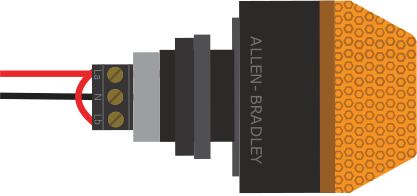
常亮 |
机器人通电并处于 Disabled 状态 |
闪烁 |
机器人通电并处于 Enabled 状态 |
不亮 |
机器人处于关机状态,roboRIO 没有通电,或是 RSL 信号灯电路没有正确连接 |
roboRIO
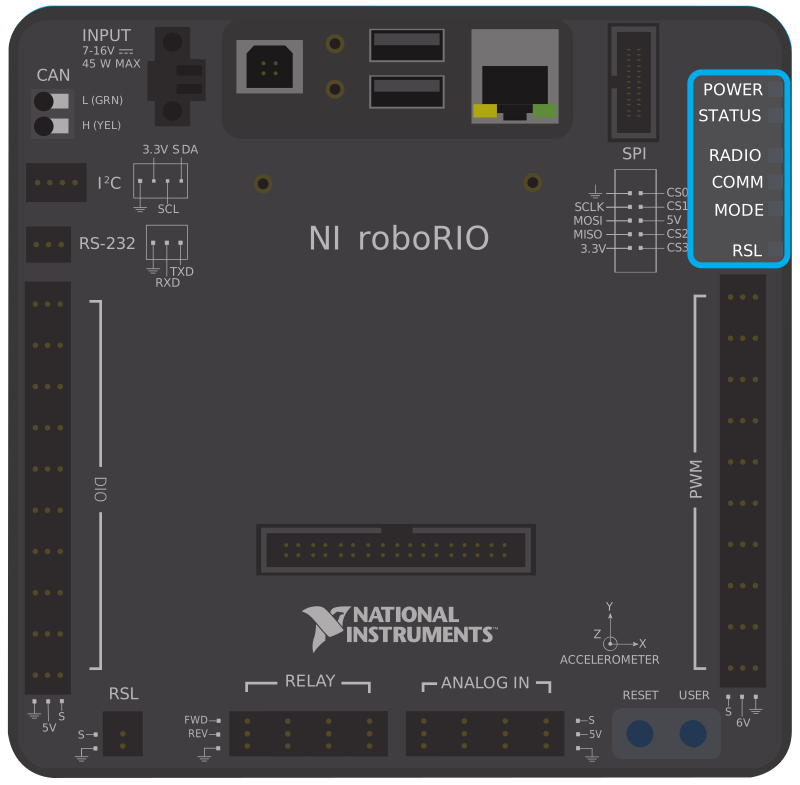
Power |
绿色 (Green) |
电源正常 |
|
橙黄色 (Amber) |
欠压保护被激活,所有输出都关闭了。 |
||
红色 (Red) |
电源故障,查找短路点 |
||
指示 |
在设备正在启动的时候常亮,过一段时间就会熄灭 |
||
双闪 |
软件错误,重新刷写roboRIO固件 |
||
三闪 |
安全模式,尝试重启roboRIO,如果无效请重新刷写roboRIO固件 |
||
闪烁四次 |
在启动时软件崩溃两次,重启roboRIO,如果无效请重新刷写固件 |
||
一直闪烁或者常亮 |
无法恢复的错误 |
||
路由器 |
现在没有被使用 |
||
通信 |
不亮 |
没有通信 |
|
红灯常亮 |
与操控台取得通信,但是没有运行的代码 |
||
红灯闪烁 |
紧急停止被触发 |
||
绿色常亮 |
与操作台通信良好 |
||
模式 |
不亮 |
输出被关闭(机器人处于Disabled状态,欠压,等……) |
|
橙色 |
自动模式激活 |
||
绿色 (Green) |
远程操作模式激活 |
||
红色 (Red) |
测试模式激活 |
||
信号灯 |
|||
Vivid-Hosting VH-109 Radio
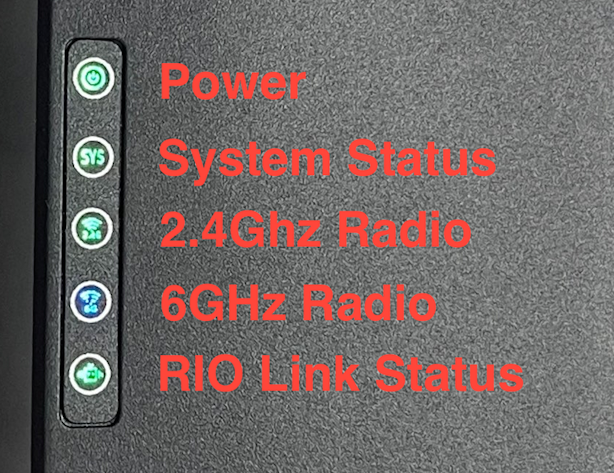
电源 |
绿色 (Green) |
开机或通电 |
不亮 |
No Power |
|
System Status |
稳定的绿色 |
Able to ping the field |
Blinking (1Hz) |
Unable to ping the field |
|
Blinking (20Hz) |
Firmware being flashed |
|
Blinking (50Hz) |
Performing “first boot” |
|
不亮 |
Booting Up |
|
2.4 GHz |
稳定的绿色 |
Wifi available |
Blinking (20Hz) Sys Blinking |
Battery detected, Wireless is disabled |
|
6 GHz |
Solid Blue |
6 GHz connection made |
Blinking (20Hz) Sys Blinking |
Battery detected, Wireless is disabled |
配电板
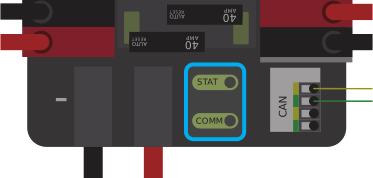
PDP指示/通信 LEDs
LED |
频闪 |
慢 |
|---|---|---|
绿色 (Green) |
无故障-机器人已启用 |
无故障-机器人已禁用 |
橙色 |
NA |
Sticky 故障 |
红色 (Red) |
NA |
没有CAN通信 |
小技巧
如果PDP LED显示不止一种颜色,请参阅下面的PDP LED特殊状态表。有关解决PDP故障的更多信息,请参见《 PDP用户手册》。
备注
Note that the No CAN Comm fault will occur if the PDP cannot communicate with the roboRIO via CAN Bus.
PDP特殊状态
LED颜色 |
问题 |
|---|---|
红色/橙色 |
受损的硬件 |
绿色/橙色 |
在引导程序中 |
无LED |
无电源/极性错误 |
Power Distribution Hub
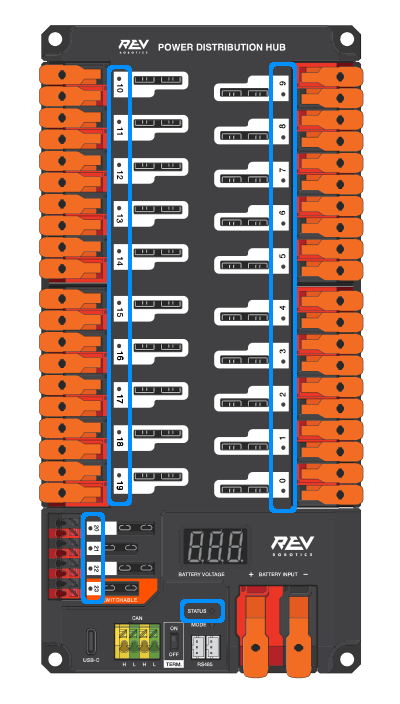
备注
These led patterns only apply to firmware version 21.1.7 and later
PDH Status LED
LED Color |
状态 |
|---|---|
Blue Solid |
Device on but no communication established |
绿色常亮 |
Main Communication with roboRIO established |
Magenta Blinking |
Keep Alive Timeout |
Solid Cyan |
Secondary Heartbeat (Connected to REV Hardware Client) |
Orange/Blue Blinking |
Low Battery |
Orange/Yellow Blinking |
CAN Fault |
Orange/Cyan Blinking |
Hardware Fault |
Orange/Red Blinking |
Fail Safe |
Orange/Magenta Blinking |
Device Over Current |
Channel LEDs
LED Color |
状态 |
|---|---|
不亮 |
Channel has voltage and is operating as expected |
红灯常亮 |
Channel has NO voltage and there is an active fault. Check for tripped or missing circuit breaker / fuse |
红灯闪烁 |
Sticky fault on the channel. Check for tripped circuit breaker / fuse. |
稳压器模块
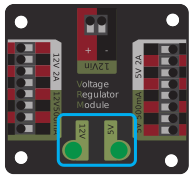
VRM上的指示LED标识两个电源的状态。如果电源正常运行,则LED应当亮绿色。如果LED不亮或暗淡,则输出可能短路或消耗过多电流。
气动控制模块(PCM)
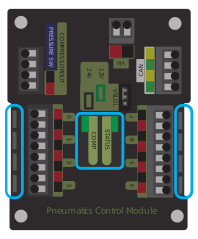
PCM状态指示LED灯
LED |
频闪 |
慢 |
长 |
|---|---|---|---|
绿色 (Green) |
无故障机器人已启用 |
Sticky 故障 |
NA |
橙色 |
NA |
Sticky 故障 |
NA |
红色 (Red) |
NA |
没有CAN通讯或电磁阀故障(闪烁电磁阀索引) |
压缩机故障 |
小技巧
如果PCM LED显示不止一种颜色,请参阅下面的PCM LED特殊状态表。有关解决PCM故障的更多信息,请参见《 PCM用户手册》。
备注
请注意,仅当设备无法与任何其他设备通信,PCM和PDP可以彼此通信,而roboRIO不能彼此通信时,才会发生 没有 CAN 通信 故障。
PCM LED特殊状态表
LED |
问题 |
|---|---|
红色/橙色 |
受损的硬件 |
绿色/橙色 |
在引导程序中 |
无LED |
无电源/极性错误 |
PCM Comp LED
这是Compressor LED。当压缩机输出处于激活状态(压缩机当前处于开启状态)时,此LED呈绿色;当压缩机输出未处于活动状态时,该LED处于熄灭状态。
PCM电磁阀通道LED
如果启用了电磁阀通道,则这些LED呈红色点亮,如果禁用则不点亮。
Pneumatic Hub
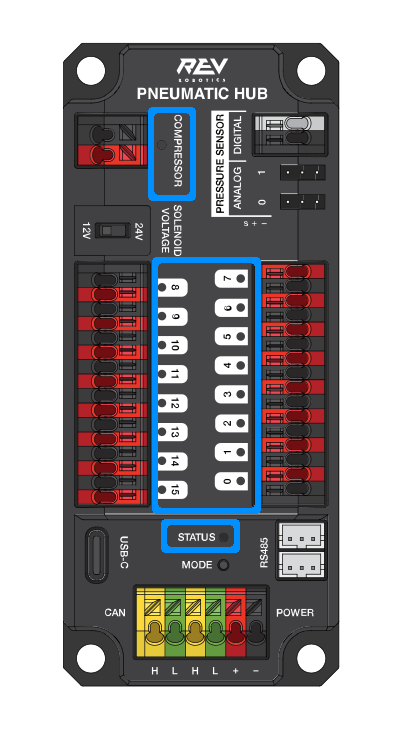
备注
These led patterns only apply to firmware version 21.1.7 and later
Pneumatic Hub Status LED
LED Color |
状态 |
|---|---|
Blue Solid |
Device on but no communication established |
绿色常亮 |
Main Communication established |
Magenta Blinking |
Keep Alive Timeout |
Solid Cyan |
Secondary Heartbeat (connected to REV HW Client) |
Orange/Blue Blinking |
Hardware Fault |
Orange/Yellow Blinking |
CAN Fault |
Orange/Red Blinking |
Fail Safe |
Orange/Magenta Blinking |
Device Over Current |
Orange/Green Blinking |
Compressor Over Current |
Compressor LED
LED Color |
状态 |
|---|---|
绿色常亮 |
Compressor On |
Black Solid |
Compressor Off |
Solenoid LEDs
LED Color |
状态 |
|---|---|
绿色常亮 |
Solenoid On |
Black Solid |
Solenoid Off |
Talon SRX & Victor SPX Motor Controllers
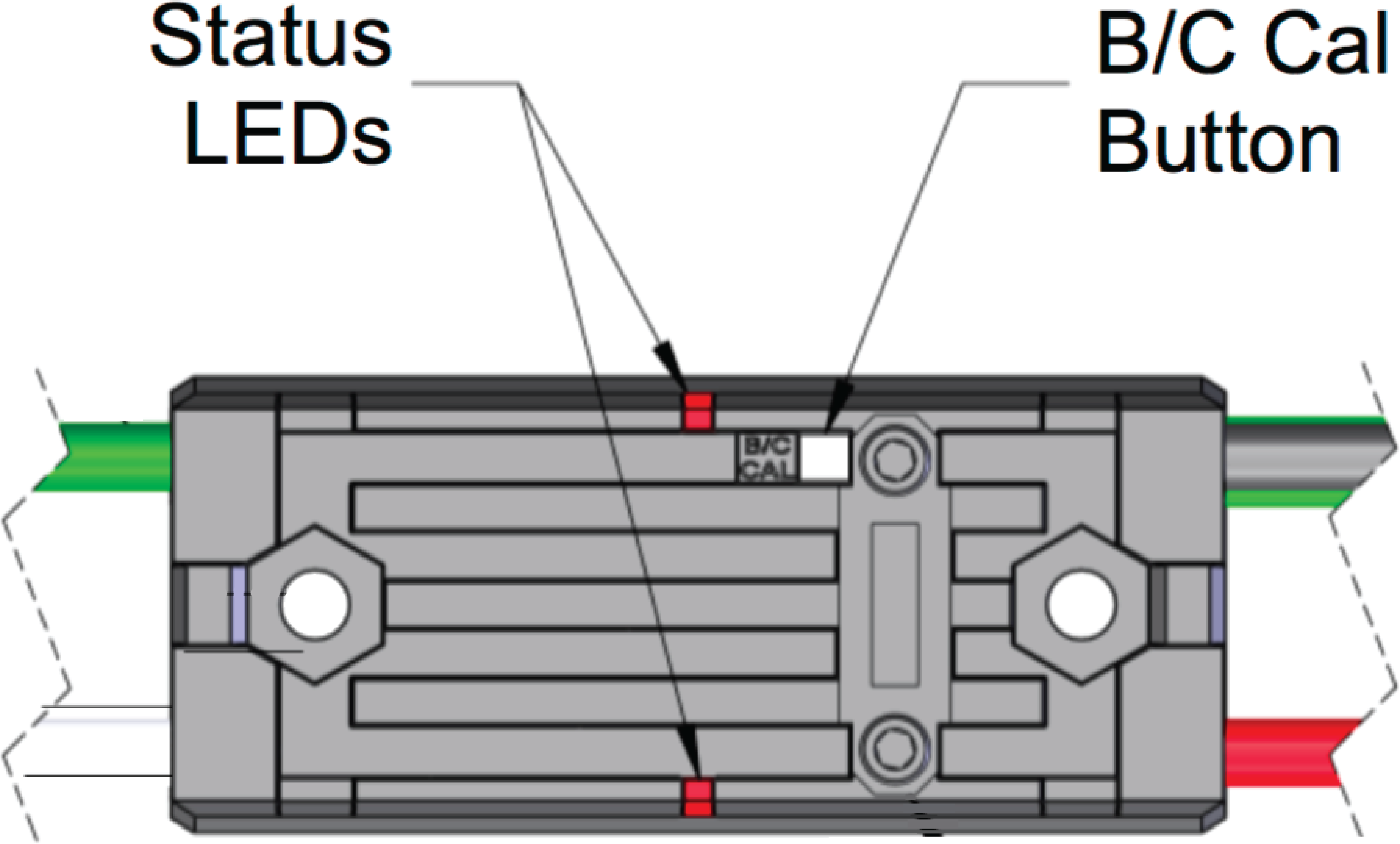
These motor controllers use Phoenix 5. For the most up-to-date information, see the CTRE Phoenix 5 Documentation.
Talon SRX/Victor SPX Status LEDs During Normal Operation
LEDs |
颜色 |
Device State |
|---|---|---|
都 |
绿色闪烁 |
应用前进油门时。闪烁速率与占空比成正比。 |
都 |
红色闪烁 |
应用了前进油门。闪烁速率与占空比成正比。 |
一无所有 |
一无所有 |
No power is being applied |
LED交替 |
关/橙色 |
检测到CAN总线,禁用了机器人 |
LED交替 |
关/慢红 |
未检测到 CAN总线/ PWM |
LED交替 |
关/快红 |
检测到故障 |
LED交替 |
红色/橙色 |
受损的硬件 |
LED频闪朝向(M-) |
关/红色 |
正向限位开关或正向软限位 |
LED频闪朝向(M +) |
关/红色 |
反向限位开关或反向软限位 |
仅LED1(最接近M + / V +) |
绿色/橙色 |
在引导程序中 |
Talon SRX/Victor SPX Status LEDs During Calibration
指示LED闪烁代码 |
Device State |
|---|---|
闪烁红色/绿色 |
校正模式 |
绿色闪烁 |
成功校准 |
红色闪烁 |
失败校准 |
Talon SRX/Victor SPX B/C CAL Blink Codes
B/C CAL按钮颜色 |
Device State |
|---|---|
稳定的红色 |
刹车模式 |
不亮 |
滑行模式 |
Talon FX Motor Controller
The Talon FX uses Phoenix 6. For the most up-to-date information, see the CTRE Phoenix 6 Documentation.
Talon FX Status LEDs
LED状态 |
Meaning |
|---|---|
LEDs Off |
No Power |
Blinking Alternating Red |
No valid CAN/PWM signal |
Blinking Alternating Orange |
CAN detected but no Phoenix running |
Blinking Simultaneous Orange |
Valid CAN signal, device disabled |
Both Solid Orange |
Enabled with neutral output |
Blinking Simultaneous Red |
Driving in reverse |
Blinking Simultaneous Green |
Driving forward |
Offset Alternating Red/Off |
Device limit reached |
Offset Orange/Off |
Thermal cutoff |
Alternate Red/Green |
Pro-only command while unlicensed |
Alternate Red/Orange |
受损的硬件 |
Single LED alternates Green/Orange |
Device in bootloader |
Talon FX B/C CAL Blink Codes
B/C CAL按钮颜色 |
Device State |
|---|---|
稳定的红色 |
刹车模式 |
不亮 |
滑行模式 |
SPARK-MAX电机控制器

REV Robotics SPARK

Victor-SP电机控制器
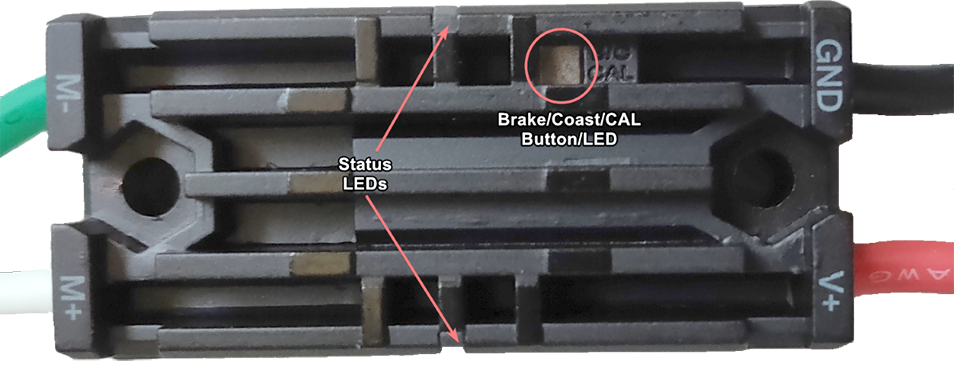
制动/惯性/校准按钮/ LED-如果控制器处于制动模式,则为红色;如果控制器处于惯性模式,则为关
状态
绿色 (Green) |
稳定 |
全前向输出 |
闪烁 |
正比输出电压 |
|
红色 (Red) |
稳定 |
全反向输出 |
闪烁 |
正比输出电压 |
|
橙色 |
稳定 |
FRC 机器人禁用,PWM信号丢失或信号在死区范围内(+/- 4%输出) |
红色/绿色 |
闪烁 |
准备进行校准。几次绿色闪烁表示校准成功,而多次红色表示校准失败。 |
Talon电机控制器

绿色 (Green) |
稳定 |
全前向输出 |
闪烁 |
正比输出电压 |
|
红色 (Red) |
稳定 |
全反向输出 |
闪烁 |
与输出电压成正比 |
|
橙色 |
稳定 |
没有连接CAN设备 |
闪烁 |
禁用状态,PWM信号丢失,FRC机械手禁用或信号在死区范围内(+/- 4%输出) |
|
不亮 |
Talon无输入电源 |
|
红色/绿色 |
闪烁 |
准备进行校准。几次绿色闪烁表示校准成功,而多次红色表示校准失败。 |
Venom电机控制器

REV Robotics Servo 电源模块
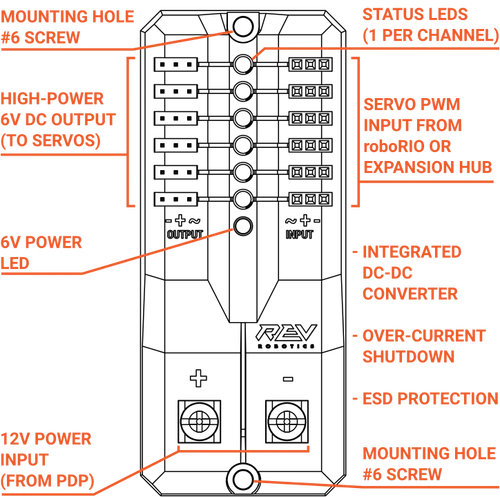
指示LED
Each channel has a corresponding status LED that will indicate the sensed state of the connected PWM signal. The table below describes each state’s corresponding LED pattern.
状态 |
模式 |
|---|---|
无信号 |
橙黄色闪烁 |
左/反向信号 |
稳定的红色 |
中间/中性信号 |
稳定的橙黄色 |
右/前信号 |
稳定的绿色 |
6V Power LED off, dim, or flickering with power applied = Over-current shutdown
REV Robotics Servo Hub
REV Servo Hub Status LED Patterns
General Status LED
LED Color |
状态 |
|---|---|
Magenta Blinking |
Powered on but not connected to a controller or the REV Hardware Client |
Blue Solid |
Connected to REV Hardware Client |
Solid Cyan |
Connected to a roboRIO or CAN controller |
绿色常亮 |
Connected to a Control Hub or RS-485 controller |
Orange/Cyan Blinking |
Battery voltage is lower than 5.5V |
Orange/Yellow Blinking |
CAN fault detected |
Orange/Magenta Blinking |
Overcurrent fault |
峰值继电器配置为电机、照明或电磁开关

输入 |
输出 |
指示器 |
马达功能 |
||
前进(白色) |
倒车(红色) |
M+ |
M- |
||
不亮 |
不亮 |
GND |
GND |
橙色 |
关/制动状态(默认) |
激活 |
不亮 |
+12v |
GND |
绿色 (Green) |
电机向一个方向旋转 |
不亮 |
激活 |
GND |
+12v |
红色 (Red) |
电机反向旋转 |
激活 |
激活 |
+12v |
+12v |
不亮 |
关/制动状态 |
备注
“制动状态”是指由于电动机输入短路而导致的电动机动态停止。进入关闭状态时,此状态不是可选的。
峰值继电器配置为一个或两个螺线管
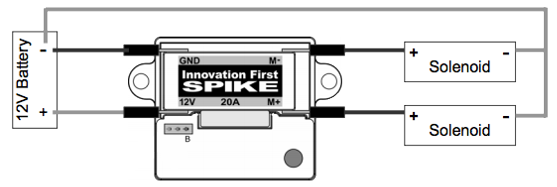
输入 |
输出 |
指示器 |
马达功能 |
||
前进(白色) |
倒车(红色) |
M+ |
M- |
||
不亮 |
不亮 |
GND |
GND |
橙色 |
两个电磁阀均关闭(默认) |
激活 |
不亮 |
+12v |
GND |
绿色 (Green) |
连接到M +的电磁阀为ON |
不亮 |
激活 |
GND |
+12v |
红色 (Red) |
连接到M -的电磁阀为ON |
激活 |
激活 |
+12v |
+12v |
不亮 |
两个电磁阀都打开 |
CANCoder Encoder
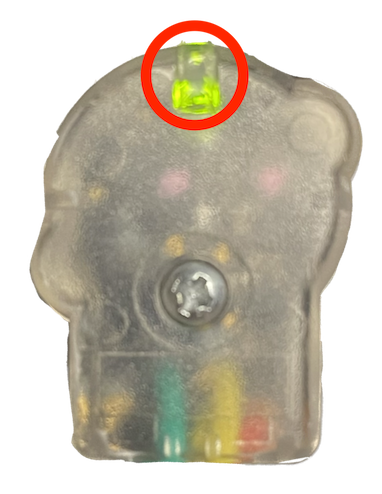
LED Color |
LED Brightness |
CAN Bus detection |
Magnet Field Strength |
Description |
|---|---|---|---|---|
不亮 |
不亮 |
CANCoder is not powered |
||
Yellow/Green |
Bright |
Device is in boot-loader. See user manual for more information. |
||
Slow Red Blink |
Bright |
CAN bus has been lost |
||
Rapid Red Blink |
Dim |
CAN bus never detected since boot |
Magnet is out of range (<25mT or >135mT) |
|
Rapid Yellow Blink |
Magnet in range with slightly reduced accuracy (25-45mT or 75-135mT) |
|||
Rapid Green Blink |
Magnet in range (between 45mT - 75mT) |
|||
Rapid Red Blink |
Bright |
CAN bus present |
Magnet is out of range (<25mT or >135mT) |
|
Rapid Yellow Blink |
Magnet in range with slightly reduced accuracy (25-45mT or 75-135mT) |
|||
Rapid Green Blink |
Magnet in range (between 45mT - 75mT) |
CANivore
