Digital Inputs - Hardware
Note
This section covers digital input hardware. For a software guide to digital inputs, see Digital Inputs - Software.
A digital signal is a signal that can be in one of several discrete states. In the vast majority of cases, the signal is the voltage in a wire, and there are only two states for a digital signal - high, or low (also denoted 1 and 0, or true and false, respectively).
The Systemcore’s built-in Smart Input/Output ports (or “Smart I/O”) ports function on 3.3V, so “high” corresponds to a signal of 3.3V, and “low” to a signal of 0V [1].
Connecting to the Systemcore Smart I/O ports
Warning
Always consult the technical specifications of the sensor you are using before wiring the sensor, to ensure that the correct wire is being connected to each pin. Failure to do so can result in damage to the device.
Warning
Never directly connect the power pin to the ground pin on any port on the Systemcore! This will trigger protection features on the Systemcore and may result in unexpected behavior.

The Systemcore has 6 Smart I/O ports (numbered 0-5), as seen in the image above. Each port has three pins - signal, power (“3.3V”), and ground (“gnd”). The “power” and “ground” pins are used to power the peripheral sensors that connect to the analog input ports - there is a constant 3.3V potential difference between the “power” and the “ground” pins [2]. The signal pin is the pin on which the signal is actually measured.
All Smart I/O ports have built-in “pull-down” resistors between the power pins and the signal pins - these ensure that when the signal pin is “floating” (i.e. is not connected to any circuit), they consistently remain in a “low” state.
Warning
The roboRIO had pull-up resistors instead of pull-down resistors, so the behavior of the Smart I/O ports is different from that of the roboRIO’s digital input ports. This means that sensors designed for the roboRIO’s digital input ports may have different wiring for the Smart I/O ports.
Connecting a simple switch to a DIO port
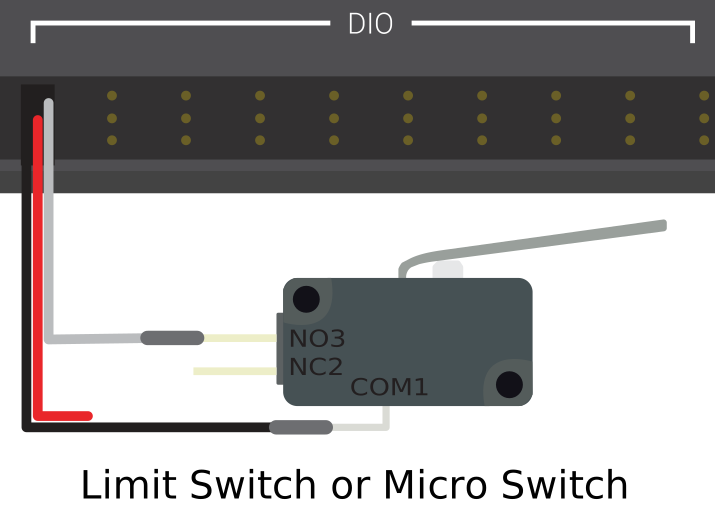
The simplest device that can be connected to a DIO port is a switch (such as a limit switch). When a switch is connected correctly to a DIO port, the port will read “low” when the circuit is open, and “high” when the circuit is closed.
A simple switch does not need to be powered, and thus only has two wires. Switches should be wired between the signal and the power pins of the DIO port. When the switch circuit is open, the signal pin will float, and the pull-down resistor will ensure that it reads “low.” When the switch circuit is closed, it will connect directly to the power rail, and thus read “high”.
Todo
Update above image to use the Systemcore Smart I/O ports and wiring for pull-down resistors.
Connecting a powered sensor to a DIO port
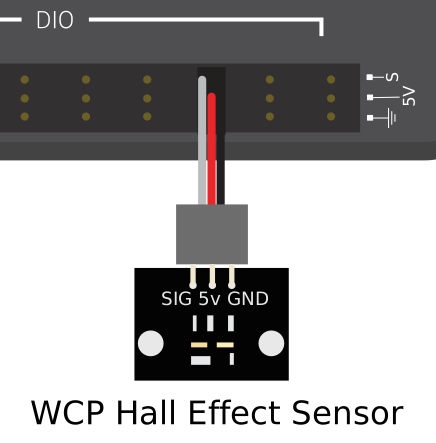
Many digital sensors (such as most no-contact proximity switches) require power in order to work. A powered sensor will generally have three wires - signal, power, and ground. These should be connected to the corresponding pins of the DIO port.
Todo
Update above image to use the Systemcore Smart I/O ports.
Warning
The roboRIO provided 5V power to the “power” pin of its DIO ports, whereas the Systemcore provides 3.3V. Sensors designed for the roboRIO’s DIO ports may not work correctly when connected to the Systemcore’s Smart I/O ports. Please consult with the sensor datasheet to ensure it can run from 3.3V.
Connecting a sensor that uses multiple DIO ports
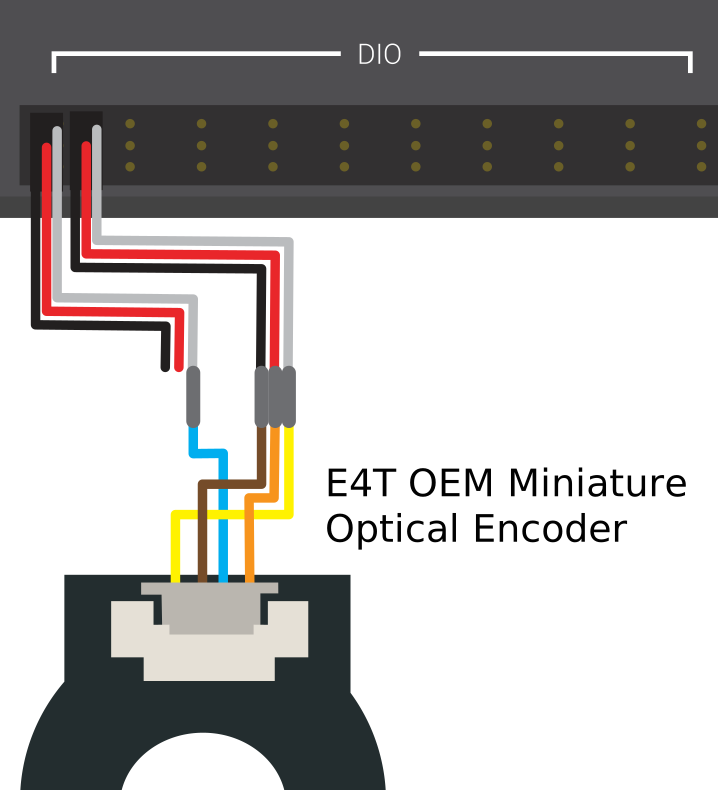
Some sensors (such as quadrature encoders) may need to connect to multiple DIO ports in order to function. In general, these sensors will only ever require a single power and a single ground pin - only the signal pin of the additional port(s) will be needed.
Todo
Update above image to use the Systemcore Smart I/O ports.